
Recently, quite a few new features appeared on AI Sensei:
Winrate Graph
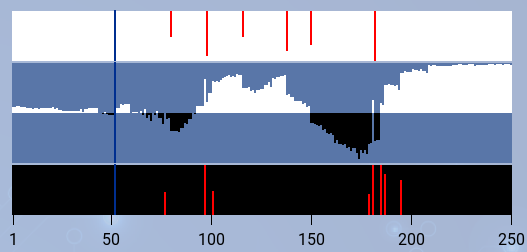
All games now have a winrate graph where you can see which player was leading at any point in time. It also shows all black and white mistakes as red lines, depending on the mistake slider position. You can click in the graph to jump to this move, or click on an error bar to jump to a mistake. Click again on the current mistake to quickly toggle between the game move and the best Leela variation.
Tags

Now you can tag games to group games e.g. from a specific tournament. In order to do so, click on the small bookmark icon next to a game. You will first need to define tags, e.g. for tournament games. In the "games" tab, next to the list of all uploads, you will see your games grouped by tag.
Tags are also useful for sharing games with friends: If you tag somebody else's game, it will also appear in your list afterwards. Also, to share all public games of a specific tag with somebody, just click on the tag above the games on the right-hand side. You now got to a new page listing all games of just one tag. You can share this URL, too.
Facebook Page and User Group
If you use this social network, check out our Facebook Page for news about AI Sensei and new game reviews.
We also started a Facebook User Group where you can share your games or discuss AI Sensei with the community.
Finally, we added a Share button to each game in case you want to show your recent game to your friends.
P.S. We only send data to Facebook if you actually click the button or links.